Getting Started with SMM Checker
Welcome to the ultimate tool for monitoring your SMM Panel API balances and analyzing social media profiles.
SMM Checker allows you to:
- Monitor multiple SMM Provider API balances in one place.
- Receive alerts when your balance drops below a certain limit.
- Analyze TikTok, Instagram, and YouTube profiles without using personal accounts.
How to Add an API
Follow these simple steps to start monitoring a new SMM Provider:
- Log in to your SMM Checker Dashboard.
- Navigate to the API Accounts or "Add API" section.
- Enter the Provider URL (e.g.,
https://provider.com/api/v2). - Enter your API Key (found in your provider's account settings).
- Set a Currency (e.g., USD, TRY) for display purposes.
- Click Add API. The system will verify the connection immediately.
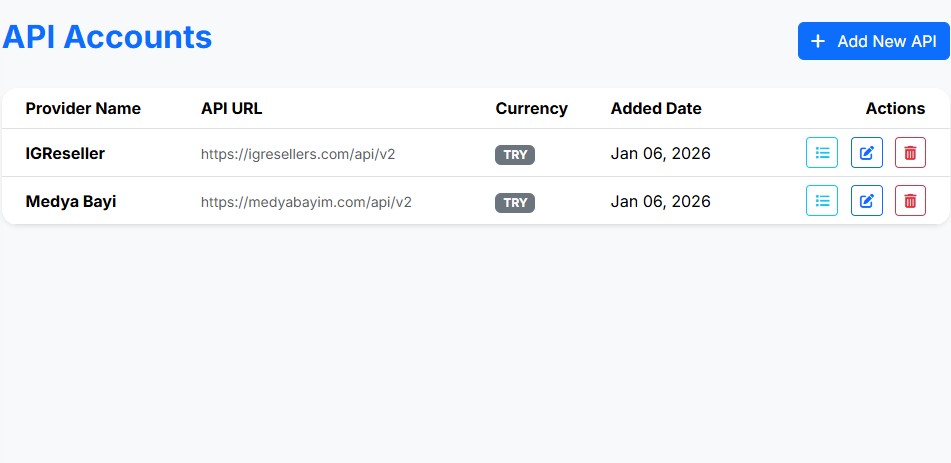
Supported API Formats
We support standard SMM Panel APIs commonly used by platforms like:
Technical Requirements
The API must support the standard balance action via POST request:
key: YOUR_API_KEYaction: balance
{"balance": "100.50", "currency": "USD"}
Balance Refresh Intervals
Your API balances are updated automatically based on your subscription plan:
| Plan | Refresh Interval | Priority |
|---|---|---|
| Free / Guest | Manual / 12 Hours | Standard |
| Basic | Every 1 Hour | High |
| Premium / Gold | Every 15 Minutes | Real-time Priority |
Note: You can always trigger a manual refresh from your dashboard once every 5 minutes.
Alerts & Notifications
Never run out of balance again. Configure alerts to get notified when your funds are low.
Setting up Alerts
- Go to Alerts in your dashboard.
- Set a Threshold Amount (e.g., $10).
- Choose your notification channel (Email, Telegram, etc.).
Security & Privacy
Your security is our top priority.
Troubleshooting
Common issues and how to fix them:
Error: Invalid API Key
Double-check that you copied the key correctly from your provider. Ensure there are no extra spaces.
Error: Connection Timeout
The provider's website might be down or blocking our server IP. Try again in a few minutes.
Balance not updating?
Check your "Refresh Interval" in the settings. If you are on a free plan, updates happen less frequently.
Still need help? Contact Support